

Mobile SDK
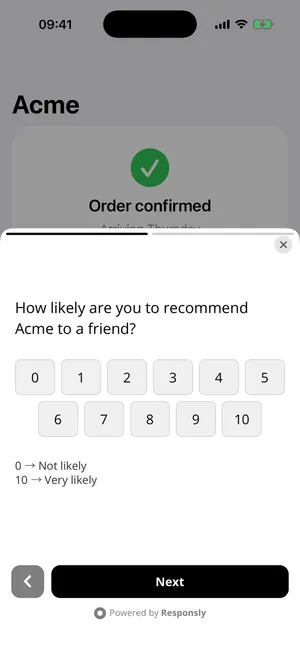
The Mobile SDK shows Responsly surveys inside your app: after an event, on a screen, at app launch, or when your code asks for one.
How it works
Section titled “How it works”- In Responsly, you turn on the Mobile app channel for a form and set who should see it and when.
- The SDK downloads that configuration when the app starts and caches it for about 10 minutes.
- Your app tells the SDK who the user is (
identify), what they do (track) and where they are (screen). - The SDK checks the rules on the device. When a survey matches, it opens in a bottom sheet, a dialog or full screen.
- The response is saved in Responsly. The user ID and attributes fill the form’s hidden fields with the same names, and your code gets callbacks.
The survey shown in the app is the same survey respondents see on the web. All question types, logic, translations and themes work, and edits go live without an app release. It is displayed in a native container that hosts a web view, so the device needs a network connection when the survey is shown.
Supported platforms
Section titled “Supported platforms”| Platform | Package | Minimum versions |
|---|---|---|
| iOS | Swift package or pod ResponslySDK | iOS 15 |
| Android | Gradle dependency com.responsly:sdk | minSdk 23 (Android 6.0) |
| React Native | npm package @responsly/react-native-sdk | React Native 0.75, iOS 15, Android minSdk 23 |
| Flutter | Dart package responsly_sdk | Flutter 3.24, Dart 3.5, iOS 15, Android minSdk 23 |
| Unity | Unity package com.responsly.sdk | Unity 2022.3 LTS, iOS 15, Android minSdk 23 |
Current version: 1.34.0 on every platform. The React Native, Flutter and Unity packages wrap the native iOS and Android SDKs, so behaviour is the same everywhere.
Get access
Section titled “Get access”The Mobile SDK is switched on per team, and its packages are provided on request. They are not listed in public package registries.
To start, write to contact@responsly.com with:
- the name of your Responsly team,
- the platforms you build for (iOS, Android, React Native, Flutter, Unity).
You get two things back:
- the Mobile app tab in your forms, with the team’s SDK key,
- access to the packages for your platforms, with the details of where to install them from.
The installation pages show the steps for each platform once you have that access.
Key concepts
Section titled “Key concepts”SDK key
Section titled “SDK key”A string that starts with rsk_. There is one per team. It identifies your team when the SDK downloads its configuration. It is public: ship it in the app, commit it, use the same key for iOS and Android.
Survey ID
Section titled “Survey ID”Identifies one form. You need it only when you show a survey from code with showSurvey. Surveys that appear through triggers need no ID in the app.
Where to find them
Section titled “Where to find them”Open the form in Responsly, go to Share and select the Mobile app tab. The tab holds the channel switch, all targeting settings, the team’s SDK key, the form’s Survey ID, and counts for the last 30 days (shown, completed, closed).
Triggers and showSurvey
Section titled “Triggers and showSurvey”There are two ways to get a survey on screen.
| Triggers | showSurvey | |
|---|---|---|
| Who decides when | You, in the Mobile app tab | Your code |
| What starts it | An event (track), a screen (screen) or app launch | A call with the Survey ID |
| Change without an app release | Yes | No |
| Typical use | NPS after the third purchase, feedback on a screen | A “Give feedback” button |
A form with no triggers is shown only by showSurvey. Audience, frequency and schedule rules apply to both, unless you call showSurvey with force. See Targeting.
Targeting runs on the device
Section titled “Targeting runs on the device”The SDK keeps the user’s attributes, event counts and display history on the device and decides there. Events and attributes are not uploaded for targeting. The server receives only anonymous counts of surveys shown, closed and completed. See Privacy & data.
Next steps
Section titled “Next steps”- Get access: have the Mobile SDK switched on and receive the packages.
- Quick start: first survey on a device in about five minutes.
- Installation: per-platform setup.
- API reference: every call on every platform.